Multiscreen Blank is a useful utility that allows you to independently blank out one or more monitors connected to your computer. It supports variable-speed fades as well as custom fade amount. This program is especially useful when running a presentation from a laptop, and will perform equally well for commercial systems with considerably more monitors.
This software started out as a simple program I wrote for personal use while giving a graduation presentation at my school. Over time, as I've done more and more presentations and ran into limitations, I've expanded the program's functionality. It has now been developed to the point that I deem it "release worthy".
DISCONTINUED PRODUCT: A new version of this application is available, and the version on this page has been discontinued. Please see the page for Multiscreen Blank v2 for more information.
How to use
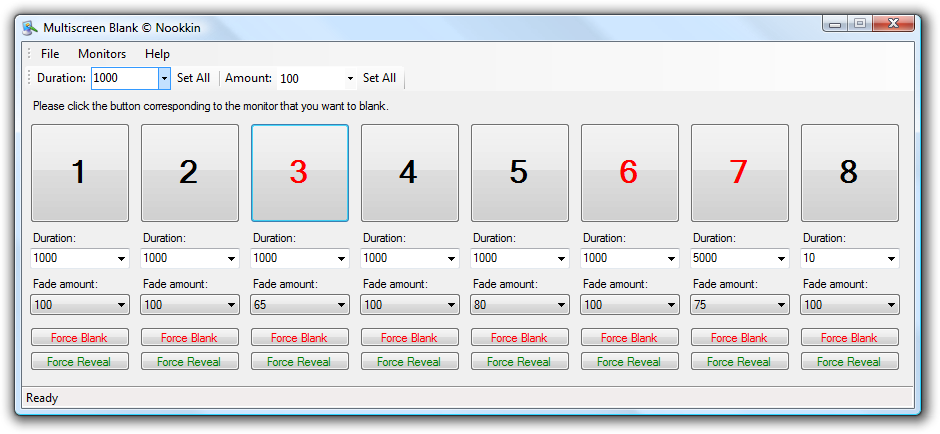
Despite the somewhat intimidating cluttered look in the screenshot above, this program is very straightforward and easy to use. The program was designed with an "all options on one screen" approach, in order to prevent frantically searching for a specific option while under pressure to dim one screen and show another.
Fading monitors in and out
Simply click the large numbered button to toggle the monitor associated with it. (The numbers on these buttons correspond to the numbers Windows assigns to your monitors, which can be changed using Display Properties.) When a monitor is blanked, the button will turn red.
Parameters
The "Duration" and "Fade amount" parameters control the way that the monitor is blanked. You can specify the duration, in milliseconds, that the fade takes place; for example, setting duration to 5000 will make the specified monitor smoothly fade from completely blank to completely open in exactly 5 seconds. The fade amount parameter specifies how far the fade goes, with 100 being fully black; this is useful when you want to dim a monitor but not blank it out all the way.
Forcing a blank or visible monitor
There are cases where you must immediately blank or reveal a monitor, i.e. due to mistakes or while switching physical equipment. These buttons will instantly blank or reveal a monitor, without applying any fade effect.
Setting defaults for all monitors
Finally, the toolbar on top allows you to set the duration and fade amounts for all monitors at the same time. This is useful when you have a large amount of monitors.
Limitations
Number of monitors
Although Multiscreen Blank supports a theoretically infinite number of monitors, the monitor on which the Multiscreen Blank window is running must be large enough to fit all monitor controls. Keep in mind that the more monitors you have connected, the longer it will take to initialize Multiscreen Blank.
Features coming in a future release
Version 1.1 of Multiscreen Blank does not support saving settings (i.e. per-monitor duration and fade amount), nor does it support "ghosting" the blanked window (which allows you to click through a black monitor and access windows open on it). The mouse cursor also will be visible on blanked-out screens, which can be useful at times but is often an annoyance. These features will be added in a future release if time allows.
Windows 9x support
Multiscreen Blank relies on the WS_EX_LAYERED window style, which is
only supported on Windows 2000 and above. Thus, although you will be able to run
Multiscreen Blank on Windows 98 and ME (with the .NET Framework 2.0 installed), you
will NOT be able to fade monitors in and out.
License
You are allowed to use Multiscreen Blank with virtually no restrictions, i.e. you may use it for both private and commercial settings free of charge. However, you may NOT use this software as part of your own projects or compilations without permission from the developer.
![[XML]](/images/xml.png)
Comments (24)
Thank you so much for this program!
for Multiscreen Blank... are there command line options available???
would be very helpful
This little utility is very great - but I would like to use the command line options.
Greetings
Norbert
few feature requests -
ability to have monitor blanked until mouse over, then when the mouse leaves the monitor to blank it again
minimize to tray
one thing would make ik that much userfriendlier.
make the order of screens displayed in the program changeable.
i am running 6 screens and windows display has them numbered randomly.
now your program has them lined up 1 to 6 but i keep on pressing the wrong one to blank.
now ive started to blank all , then doubleclick the ones id like to unblank.
imagine peole with morescreens.
a possibility to assign screens to a position in your program would complete it.
computer / laptop me. thanks
Yes! Please!!
Fading monitor in/out based on mouse is the holy grail, if you ask me.
Those working with multiple monitors may wish to save their eyes from unnecessary glare, and an automatic solution is best for this. I don't think this feature exists in any software. I've checked.
Thanks for the app. It solved a specific need and works well. I look forward to being able to ghost a blacked out screen in a future version. If you ever stop actively developing the app I hope you release the source. It's too useful to be lost.
Thanks.
http://nookkin.com/software/multiscreen-blank-v2.ndoc
Leave a comment